An EQ that compensates for level differences automatically.
Product page: plugins.stemwire.io/audio-plugins/levelproof-eq
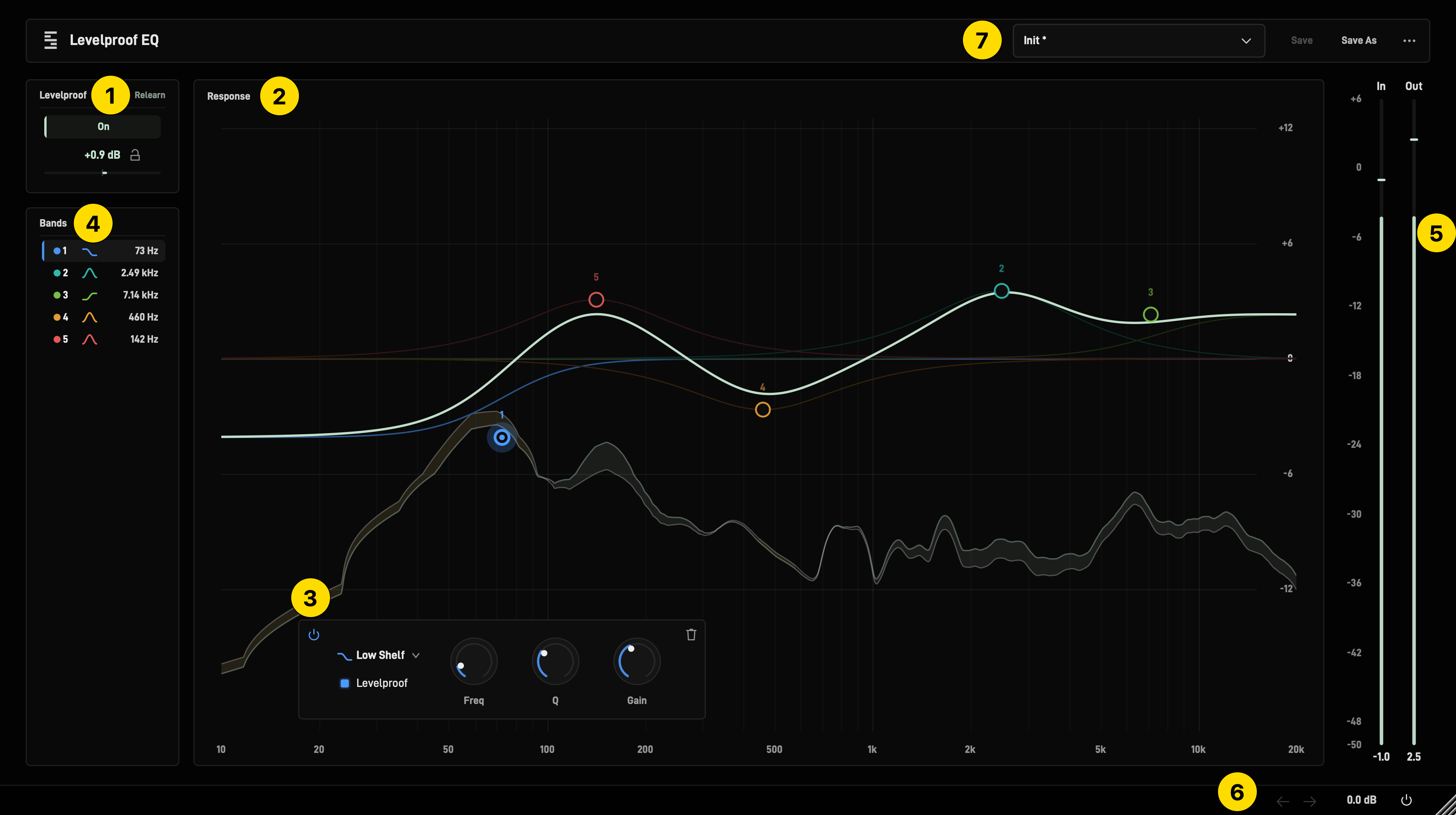
| # |
Part |
Function |
| 1 |
Levelproof |
Matches the output loudness to the input loudness |
| 2 |
Graph |
Add and edit bands |
| 3 |
Band panel |
Controls of the selected band |
| 4 |
Bands |
Band list |
| 5 |
Meters |
Input and output level |
| 6 |
Footer |
Undo, redo, output, bypass |
| 7 |
Presets |
Load and save settings |
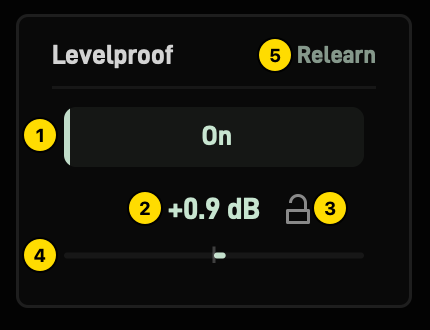
| # |
Control |
Function |
| 1 |
On |
Levelproof on or off |
| 2 |
Value |
Makeup gain |
| 3 |
Lock |
Hold the makeup gain |
| 4 |
Bar |
Makeup gain, ±12 dB scale |
| 5 |
Relearn |
Measure again; shows Learning while measuring |
| Situation |
Levelproof |
| Edit to a band with Levelproof on |
Measures, then holds the value |
| Playback, bounce, project reload |
Value holds |
| Band with Levelproof off |
Not matched; its level change is heard |
| Gesture |
Result |
| Click on empty area |
New band |
| Drag a band |
Frequency, gain |
| Shift + drag |
Fine |
| Scroll on a band |
Q; slope on High Pass and Low Pass |
| Shift + scroll |
Fine Q |
| Double-click a band |
Delete |
| Right-click a band |
Band menu |
| Drag on empty area |
Select bands |
| Shift + click a band |
Add to or remove from selection |
| Click on the 0 dB line |
New band |
| At the left edge |
High Pass |
| Near the left edge |
Low Shelf |
| Near the right edge |
High Shelf |
| At the right edge |
Low Pass |
| Anywhere else |
Bell |
Click above or below the 0 dB line: Bell at that gain.
High Pass and Low Pass: drag up or down for Q. No Q at 6 dB/oct.
| Gesture |
Result on every selected band |
| Drag |
Frequency and gain. Bands below 0 dB move the opposite way. |
| Scroll |
Q; slope on High Pass and Low Pass |
| Delete |
Delete |
| Key |
Result |
| Cmd + A (Ctrl + A) |
Select all bands |
| Delete, Backspace |
Delete selected bands |
| Esc |
Close band menu, clear selection |
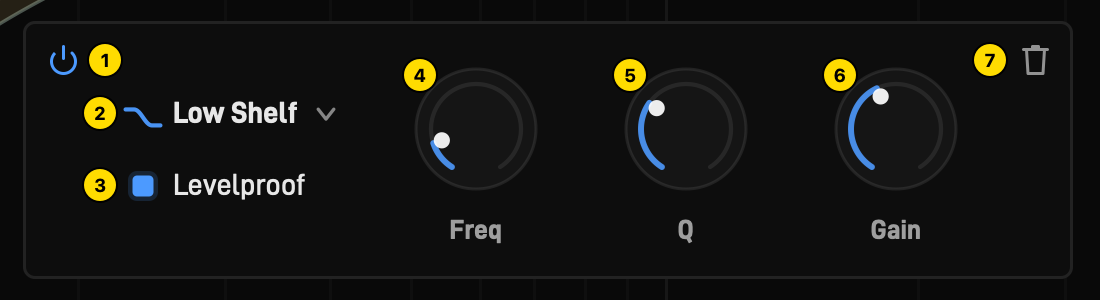
| # |
Control |
Function |
| 1 |
Power |
Band on or off; settings stay |
| 2 |
Type |
Bell, Low Shelf, High Shelf, High Pass, Low Pass |
| 3 |
Levelproof |
On: band matched by Levelproof |
| 4 |
Freq |
10 Hz to 20 kHz |
| 5 |
Q |
0.044 to 18 |
| 6 |
Gain |
±24 dB; on High Pass and Low Pass: Slope, 6 to 96 dB/oct |
| 7 |
Trash |
Delete band |
| Knob gesture |
Result |
| Shift + drag |
Fine |
| Double-click |
Reset |
| Right-click |
Enter, copy or paste a value |
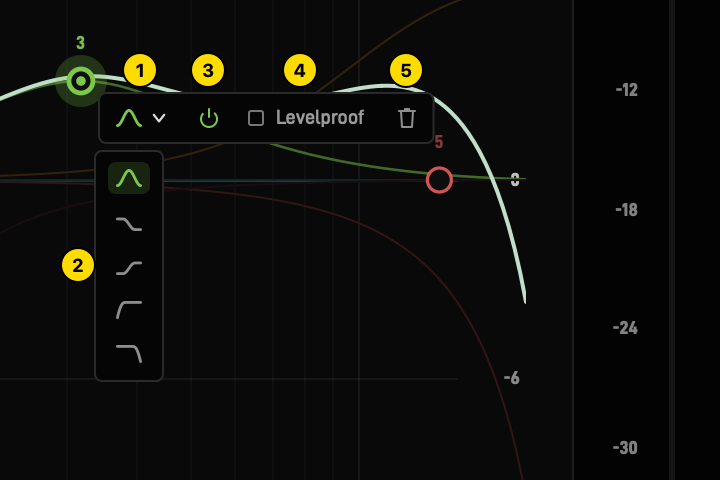
| # |
Control |
Function |
|
Open |
Right-click a band in the graph or in Bands |
| 1 |
Type |
Open the type list |
| 2 |
Type list |
Bell, Low Shelf, High Shelf, High Pass, Low Pass |
| 3 |
Power |
Band on or off |
| 4 |
Levelproof |
On: band matched by Levelproof |
| 5 |
Trash |
Delete band |
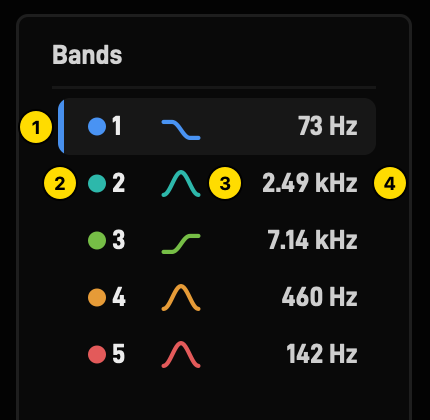
| # |
Item |
Function |
| 1 |
Marker |
Selected band |
| 2 |
Dot, number |
Band colour and number; dimmed: band off |
| 3 |
Icon |
Type |
| 4 |
Frequency |
Band frequency |
| Gesture |
Result |
| Click |
Select |
| Shift + click |
Add to or remove from selection |
| Right-click |
Band menu |
| Item |
Function |
| In, Out |
Level, dBFS |
| Click the number under a meter |
Reset peak |

| # |
Control |
Function |
| 1 |
Undo |
Step back |
| 2 |
Redo |
Step forward |
| 3 |
Output |
Output gain, ±24 dB; drag up or down, knob gestures |
| 4 |
Power |
Bypass |
| 5 |
Corner |
Drag to resize the window |

| # |
Control |
Function |
| 1 |
Preset name |
Preset list, search, pin to keep at the top (not Init) |
| 2 |
Save |
Save the user preset; not for Init |
| 3 |
Save As |
New user preset |
| 4 |
Menu |
Open the menu |
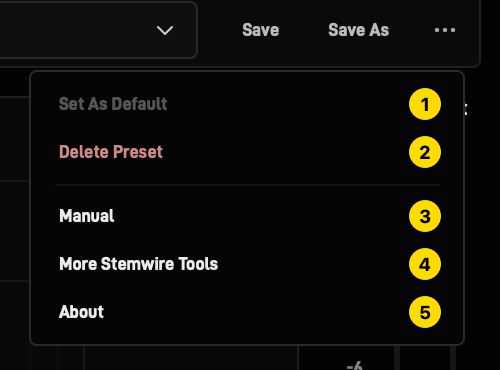
| # |
Menu item |
Function |
| 1 |
Set As Default |
Load when the plugin opens |
| 2 |
Delete Preset |
Delete the user preset |
| 3 |
Manual |
This page |
| 4 |
More Stemwire Tools |
stemwire.io/audio-plugins |
| 5 |
About |
Version, support, website |